Resetting or changing the login or Camtel default password is always tricky for users activating Camtel Cameroon 4G internet.

The website www.myxtremnet.cm is the official website to activate or subscribe to a Camtel bundle or package. The interface is very straightforward. However, some internet users on Camtel Cameroon face challenges in changing the default Camtel password.
Contents
What is the default Camtel Myxtremnet Password?
The default Camtel password for first-time users who want to log in to the X-Tremnet or myxtremnet interface is 12345678 or 123456789.

Users must change this default Camtel password after the first login on the Camtel myxtremnet platform or interface.
Login to www.myxtremnet.Cm: How to Reset and Change Your Camtel Default Password?
- To change or reset your Camtel default password or Myxtremnet (Xtremnet) password, do the following:
- Go to the official Camtel Xtremnet website that is accessible at https://www.myxtremnet.cm.
- Click on the “Forgot Password” link.
- Fill in the change or reset the Camtel online form with the correct information. The information demanded includes your Camtel number and accurate national ID information.
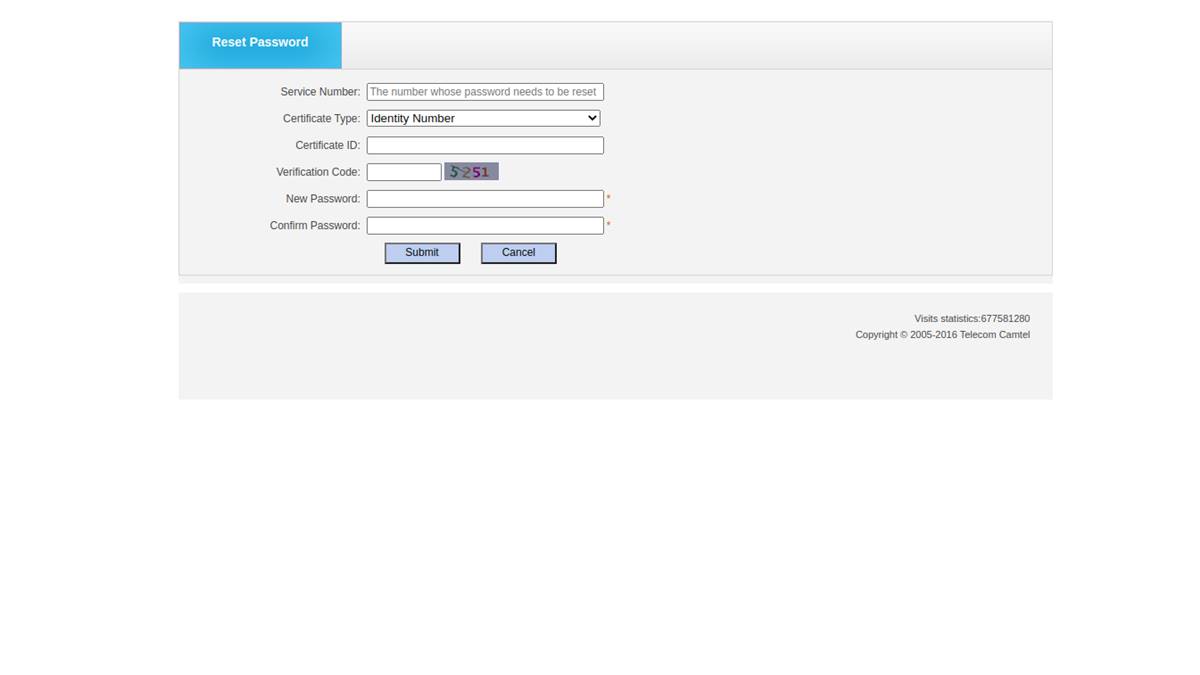
- Click on the submit button to reset or change your Camtel default password.

Read Also: How to buy Camtel internet credit online.